In today’s fast-paced world, staying connected is more important than ever. Whether it’s sending reminders, birthday wishes, or important announcements, timely communication is key. However, there are times when we may want to send a message at a specific time in the future. Fortunately, Android devices offer several methods to schedule texts, ensuring that your messages are delivered exactly when you want them to be.
Content
Introduction to scheduling text on Android
Text scheduling allows users to compose messages in advance and set a specific time for them to be sent automatically. This feature comes in handy for various purposes, such as sending birthday wishes at midnight, reminding someone of an upcoming appointment, or sending important updates to a group of people.
Why schedule texts?
Scheduling texts offers convenience and efficiency, allowing users to manage their communications more effectively. It eliminates the need to remember to send messages at specific times, ensuring that important messages are never forgotten or sent late.
Understanding schedule text on Android apps
Popular text-scheduling apps
Several third-party apps are available on the Google Play Store that specialize in text scheduling. These apps offer additional features such as message templates, recurring schedules, and customization options.
Features to look for in a text scheduling app
When choosing a text scheduling app, look for features like ease of use, reliability, and compatibility with your device. Additionally, consider whether the app offers encryption for added security and privacy.
How to Schedule Text on Android using built-in features on Android
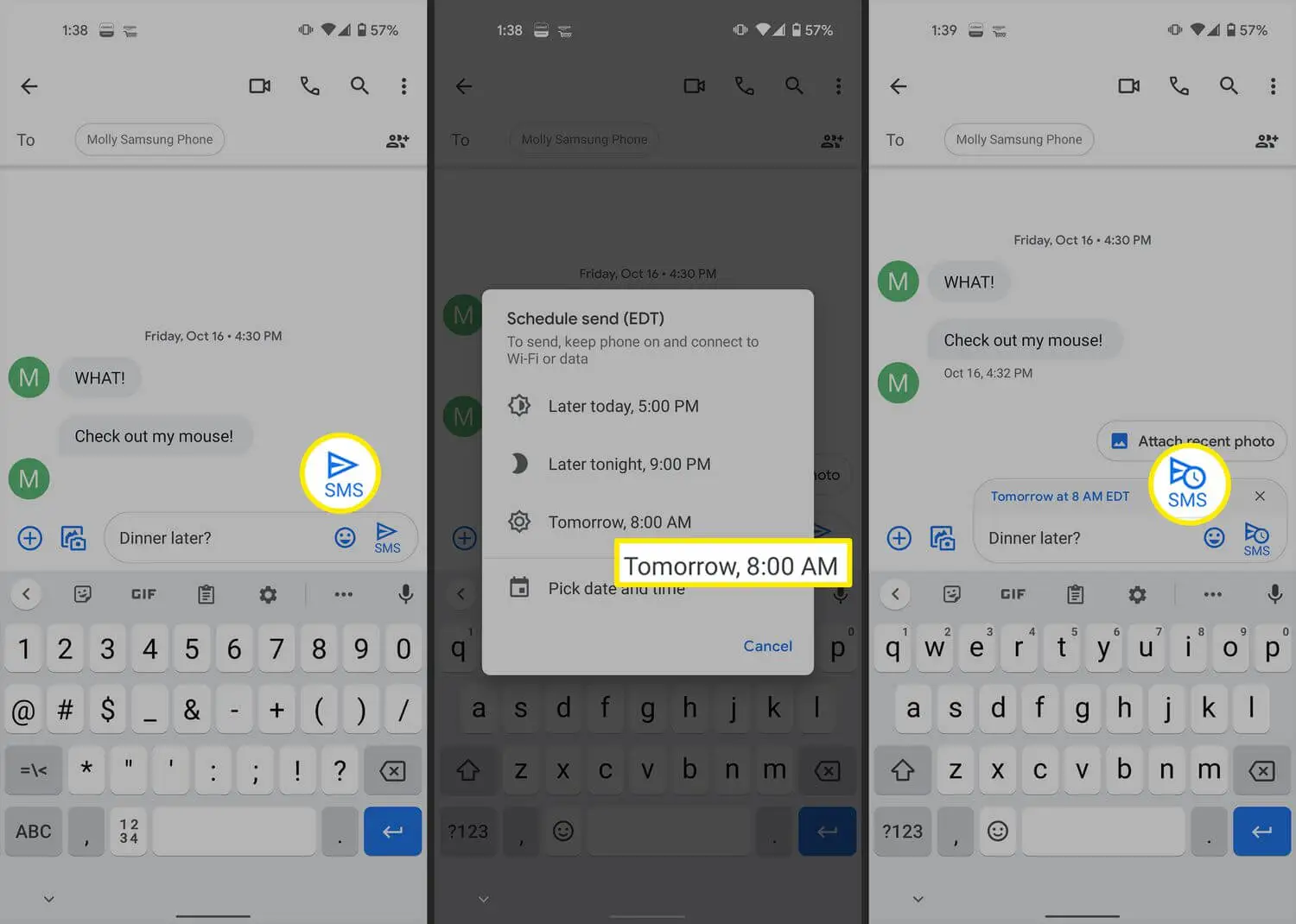
Android devices come equipped with built-in features that allow users to schedule texts without the need for third-party apps. Here’s a step-by-step guide:
Open the Messaging app on your Android device.
Compose your message as usual.
Instead of tapping the send button, press and hold it.
A menu will appear with the option to schedule the message.
Select the desired date and time for the message to be sent.
Tap “Send” to schedule the text.
Alternative Methods for Schedule Text on Android
In addition to built-in features, there are alternative methods for scheduling texts on Android devices:
Using third-party messaging apps
Some messaging apps, such as WhatsApp and Telegram, offer built-in scheduling features. These apps allow users to compose messages and schedule them for delivery at a later time.
Task automation apps for scheduling texts
Task automation apps like Tasker and Automate allow users to create custom workflows for automating various tasks, including text scheduling. By creating a simple script, users can schedule texts to be sent automatically based on predefined conditions.
Tips for effective text scheduling
To make the most of text scheduling, consider the following tips:
Timing considerations
Choose the timing of your scheduled texts carefully to ensure maximum impact. Avoid sending messages during late hours or early mornings unless necessary.
Crafting the perfect message
Take the time to craft personalized and meaningful messages that resonate with the recipient. Avoid generic or spam-like messages that may be perceived as insincere.
Ensuring reliability and privacy
When scheduling texts, it’s essential to prioritize reliability and privacy. Ensure that the chosen method or app is secure and trustworthy, especially when dealing with sensitive or confidential information.
Security measures for scheduled texts
Opt for text-scheduling apps that offer end-to-end encryption to protect your messages from unauthorized access or interception.
Backup options
Consider enabling backup options for scheduled texts to prevent data loss in case of device malfunction or accidental deletion.
Schedule texts on Android devices offer a convenient way to manage communications and ensure the timely delivery of important messages. Whether using built-in features or third-party apps, users can leverage text scheduling to streamline their workflow and stay connected with others effectively.
FAQs
Can I schedule texts on Android without using third-party apps?
Yes, Android devices offer built-in features that allow users to schedule texts without the need for third-party apps.
Are there any limitations to scheduling texts on Android?
While text scheduling is convenient, some limitations may apply, such as the inability to schedule texts for certain messaging apps or limitations imposed by carriers.
Can I schedule recurring texts on Android?
Some third-party text scheduling apps offer the option to schedule recurring texts, allowing users to send messages at regular intervals.
Is text scheduling secure?
Text scheduling apps that offer end-to-end encryption ensure that messages remain secure and protected from unauthorized access.
Meet Herry White, the passionate tech enthusiast and driving force behind FreeAppsForYou.com. With a deep-rooted love for all things mobile apps, Herry’s journey began in the school days when he first laid hands on a smartphone. From that moment on, he was captivated by the endless possibilities that these pocket-sized wonders offered.